Showing posts with label SolarNetwork. Show all posts

Tuesday, October 24, 2017

SolarQuant gets a push forward from University of Auckland

One of the exciting developments at Greenstage Power has been some collaboration with University of Auckland on our experimental machine learning module called SolarQuant. This is the stand alone app server that takes consumption or generation data and aims to learn how that energy flow happened, based on the context of when it happened and what the environmental conditions were at the time. We had a visitor to New Zealand from MIT Engineering named Paige Studer, and she was instrumental at giving SolarQuant a push forward. We interviewed Paige below on the project:


Tell us a little about what you worked on at UofA
During my time at the University of Auckland, I had the privilege to work on SolarQuant, which is a program that is working to accurately predict a building’s energy consumption given a set of inputs such as time, weather, temperature, etc. When I arrived at the UofA, the current state was that SolarQuant could take inputs and a building’s energy consumption to find weights for each of the inputs. Then given only the inputs and found weights, it would map how closely the calculated energy consumption matched the actually energy consumption. The next step was to see if we could get similar results by taking predicted inputs, getting a calculated energy consumption, and compare it with the actual inputs with actual consumption.
One of the main factors in being able to do this was formatting the predicted weather so that it looked the same as the actual weather, with the exception of a type id showing that it was predicted and not actual. The predicted weather was taken from Norwegian weather, in the form of an XML file. The program would go through the file and find entries that had all of the information that we needed and added them to an initial array. This array with the predicted weather data had problems, such as not being sorted, having repeating information, etc. This initial array needed to be cleaned up and adjusted to make it look like real data. A second array was constructed so that the time of each prediction was in chronological order and separated by thirty minutes, without any repeating or missing times. Once this was completed, the program would go through that array, create weather datum objects and place those objects into a database to be used in the future.
Because the future weather in the database looked the same as actual weather in the database, we could use it on the SolarQuant platform. From here the program takes the future weather data, downloads it, and instead of training it on energy consumption, it skips straight to the questioning stage since it is the future there is no energy consumption to train off of. After this, John was going to add his code and we would hopefully see predicted energy consumption and eventually compare this with actual energy consumption for the same time period.
Do you think it will work?
Yes, of course I think it will work! Theoretically it will, so if it doesn’t right away it would be due to some bugs in the code that can be fixed. I’m very excited to see where it goes in the future once it is working, because there are some pretty cool applications. One in particular that I find to be interesting is if we can accurately predict the weather and a building’s energy consumption, given a solar/battery system, you could potentially become smarter at when to charge and discharge your battery.
As a developer what are the challenges SolarQuant is going to have – what should we get ready for?
I think that SolarQuant will only be getting better and faster, and that it will be important to stay flexible and be able to adjust with the program. For instance, one thing that John and I had talked about was possibly using a different weather source for predicted weather and how to handle it. Do you make one function that can handle all different weather sources, make a function for each weather source, etc? Being open to change in the code and sources in the future will make a difference in how well SolarQuant will continue to progress. I think one idea that John reiterated that was helpful is we want to walk before we run, meaning let’s make small additions/changes and make sure that works before progressing. We don’t want to write all this code and have it not work without us knowing why.
Did you like NZ? We heard you went bungy jumping!?
New Zealand was absolutely awesome! I loved meeting new people, learning about the Maori culture, and especially loved the adventure atmosphere of New Zealand. On the weekends I was able to go on lots of side trips, my favorite being Queenstown where I did the Kawarau Bridge bungy jump, Waitomo black water rafting, and sand boarding while I was visiting the Bay of Islands.
What are the next plans, where to?
I will begin working at a solar energy company in Southern California that specializes in getting schools solar energy, often in the form of carports. I will be an Assistant Project Engineer there, and I hope to learn more about solar energy projects, continue to grow my skillsets, and make a positive impact on the community.

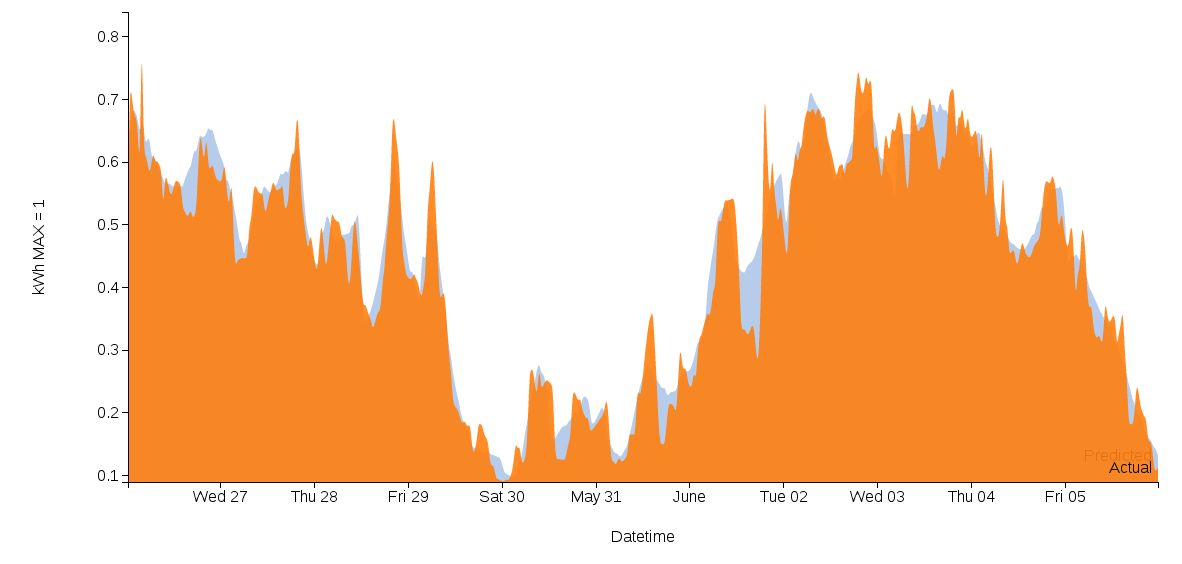
SolarQuant comparing predicted consumption (blue) with actual (orange) consumption after training on 1 year of data

Some of the results from Paige's work coming in are shown above in a screenshot of the SolarQuant interface. The trained network predicted a time series in light blue here, and the actual power consumption is shown in orange. Thanks once again to Dr. Nirmal Nair at University of Auckland ECE who made this possible! And developers can checkout SolarQuant as it progresses here: git@github.com:SolarNetwork/solarquant.git

Sunday, May 28, 2017

FreeBSD with Poudriere on ZFS with custom compiler toolchain

The SolarNetwork main infrastructure has always run on FreeBSD. FreeBSD is great for allowing packages to be built with options suited to how you want to use it, by building packages from source via the ports tree. FreeBSD has evolved over the years since SolarNetwork started to distributing binary packages via the pkg tool. That can save a lot of time, not having to compile all the software used from source, but doesn't work if some package needs a different set of compiled-in options than provided by FreeBSD itself. Additionally, I'd been compiling the packages using a specific version of Clang/LLVM rather than the one used by FreeBSD (originally because one package wouldn't compile without a newer compiler version than used by FreeBSD).

Fast forward to now, and FreeBSD has a tool called poudriere, which can compile a set of packages with exactly the options needed and publish them as a FreeBSD package repository, from which any FreeBSD machine can then use to download the binary packages from and install them via pkg. It's a bit like starting your own Linux distro, picking just the software and compile options you need and distributing them as pre-built binary packages.

Finally I took the time to set up a FreeBSD build machine running poudriere (in a virtual machine) and can much more easily perform updates on the SolarNetwork infrastructure. There was just one major stumbling block along the way: I didn't know how to get pourdriere to use the specific version of Clang I needed. There is plenty of information online about setting up poudriere, but I wasn't able to find information online about getting it to use a custom compiler toolchain. After some trial and error, here's how I finally ended up accomplishing it:

Create toolchain package repository

Poudriere works with FreeBSD jails to manage package repositories. Each package distribution uses its own jail with its own configuration such as what compiler options to use and which packages to compile. The first task is to create a package repository with the toolchain packages needed, in my case this is provided by the devel/llvm39 package. This toolchain repository can then be installed in other poudriere build jails to serve as their compiler.

Once poudriere was installed and configured properly, the steps looked like this:

# Create jail
poudriere jail -c -j toolchain_103x64 -v 10.3-RELEASE
mkdir /usr/local/etc/poudriere.d/toolchain_103x64-options

# Create port list (for this jail, just the toolchain needed, devel/llvm39)
echo 'devel/llvm39' >/usr/local/etc/poudriere.d/toolchain-port-list

# Update to latest (each time build)
poudriere jail -u -j toolchain_103x64
poudriere ports -u -p HEAD

# Configure options
poudriere options -j toolchain_103x64 -p HEAD \
    -f /usr/local/etc/poudriere.d/toolchain-port-list

# Build packages
poudriere bulk -j toolchain_103x64 -p HEAD \
    -f /usr/local/etc/poudriere.d/toolchain-port-list

After quite some time (llvm takes a terribly long time to compile!) the toolchain packages were built and I had nginx configured to serve them up via HTTP.

Create target system package repository

Now it was time to build the packages for a specific target system. In this case I am using the example of building a Postgres 9.6 based database server system, but the steps are the same for any system.

First, I created the system's poudriere jail:

# Create jail
poudriere jail -c -j postgres96_103x64 -v 10.3-RELEASE

# Create port list for packages needed
echo 'databases/postgresql96-server' \
    >/usr/local/etc/poudriere.d/postgres96-port-list

echo 'databases/postgresql96-contrib' \
    >>/usr/local/etc/poudriere.d/postgres96-port-list

echo 'databases/postgresql-plv8js' \
    >>/usr/local/etc/poudriere.d/postgres96-port-list

# Configure options
poudriere options -j postgres96 -p HEAD \
    -f /usr/local/etc/poudriere.d/postgres96-port-list

Second, install the llvm39 toolchain, using the custom toolchain repository:

# chroot into the build jail
chroot /usr/local/poudriere/jails/postgres96_103x64

# enable dns resolution for the build server (if DNS names to be used)
echo 'nameserver 192.168.1.1' > /etc/resolv.conf

# Copy /usr/local/etc/ssl/certs/poudriere.cert from HOST
# to /usr/local/etc/ssl/certs/poudriere.cert in JAIL
mkdir -p /usr/local/etc/ssl/certs
# manually copy poudriere.cert here

Then I configured pkg to use the toolchain repository via a /usr/local/etc/pkg/repos/poudriere.conf file:

poudriere: {
    url: "http://poudriere/packages/toolchain_103x64-HEAD/",
    mirror_type: "http",
    signature_type: "pubkey",
    pubkey: "/usr/local/etc/ssl/certs/poudriere.cert",
    enabled: yes,
    priority: 100
}

The URL in this configuration resolves to the directory where poudriere build the packages, served by nginx. Next I installed the toolchain, explicitly telling pkg to use this repository:

pkg update
pkg install -r poudriere llvm39

# clean up and exit the chroot
rm /etc/resolv.conf
exit

Now I can configure poudriere to use the toolchain by creating a /usr/local/etc/poudriere.d/postgres96_103x64-make.conf file with content like this:

# Use clang
CC=clang39
CXX=clang++39
CPP=clang-cpp39

DEFAULT_VERSIONS+=pgsql=9.6 ssl=openssl

The next step is what took me the longest to figure out, probably because I had not studied how poudriere works with ZFS very carefully. It turns out poudriere makes a snapshot of the jail named clean, and then clones that snapshot each time it performs a build. So all I needed to do was re-create that snapshot:
 
# Recreate snapshot for build
zfs destroy zpoud/poudriere/jails/postgres96_103x64@clean
zfs snapshot zpoud/poudriere/jails/postgres96_103x64@clean

Finally, the build can begin normally, and the custom toolchain will be used:

# Build packages
poudriere bulk -j postgres96_103x64 -p HEAD \
    -f /usr/local/etc/poudriere.d/postgres96-port-list

Update target system to use poudriere repository

Once the system's build is complete, it is possible to configure pkg on that system to use the toolchain repository via a /usr/local/etc/pkg/repos/poudriere.conf file:

poudriere: {
    url: "http://poudriere/packages/postgres96_103x64-HEAD/",
    mirror_type: "http",
    signature_type: "pubkey",
    pubkey: "/usr/local/etc/ssl/certs/poudriere.cert",
    enabled: yes,
    priority: 100
}

Then I copied the certificate from the build host to the file as configured above. I no longer want to use the default FreeBSD packages on this system, so I created a /usr/local/etc/pkg/repos/freebsd.conf file to disable it, with the following content:

FreeBSD: {
    enabled: no
}

Done! Now, after running pkg update, all packages will install from the poudriere repository, and I no longer need to compile the software on the system itself.

Sunday, December 11, 2016

SolarQuant: Experimental Deep Learning for SolarNetwork : Part 1


Experiments with Energy Signatures

One of the interesting aspects of energy management is being able to react to trends in your energy flows to optimise the way energy is used at your home or business. Understanding the patterns in a building’s energy use allows energy managers to plan and scope the kinds of energy sources needed and figure out how much money that energy will cost them today and in the future. Until recently, this has been something studied by local authorities and planners within large corporations or organisations. However, as rooftop solar systems are becoming more and more common, these energy flows are something you can actually inspect yourself. With SolarNetwork, we’ve demonstrated easy and affordable ways to roll-out energy monitoring across your home or business, using a variety of devices. Once that data is stored in SolarNet, the cloud repository, you can also get to it via the SolarQuery RESTful API from just about any development platform you choose. What we are experimenting with now is one of those applications which we’re calling SolarQuant.

SolarQuant is an application server being written in PHP and MySQL, accessing a non-linear neural network program called emergent. The aim is to produce a "point and shoot" application server that can watch the data coming from a SolarNode - whether it is a single circuit or multiple circuits - and develop an "energy signature" to characterise how energy is used or generated at that location.

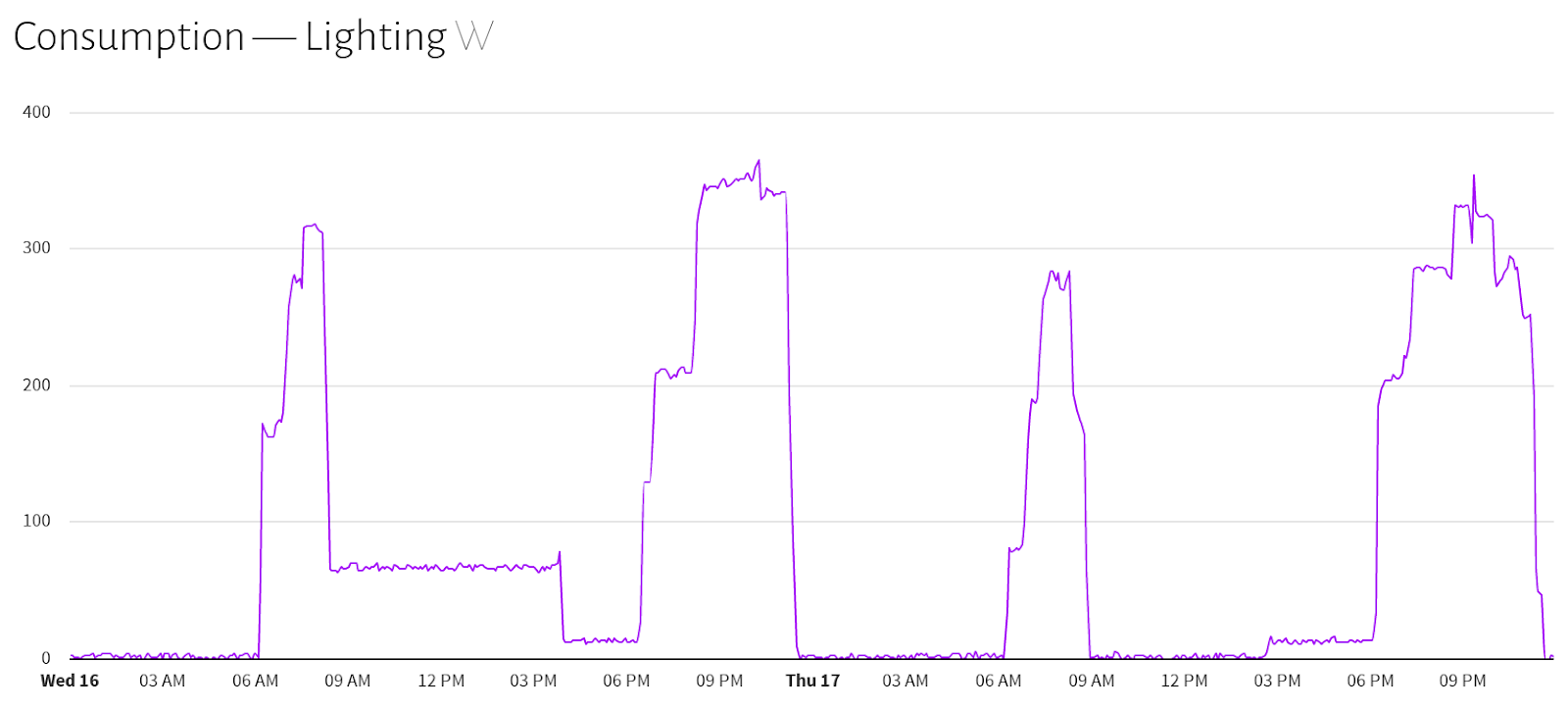
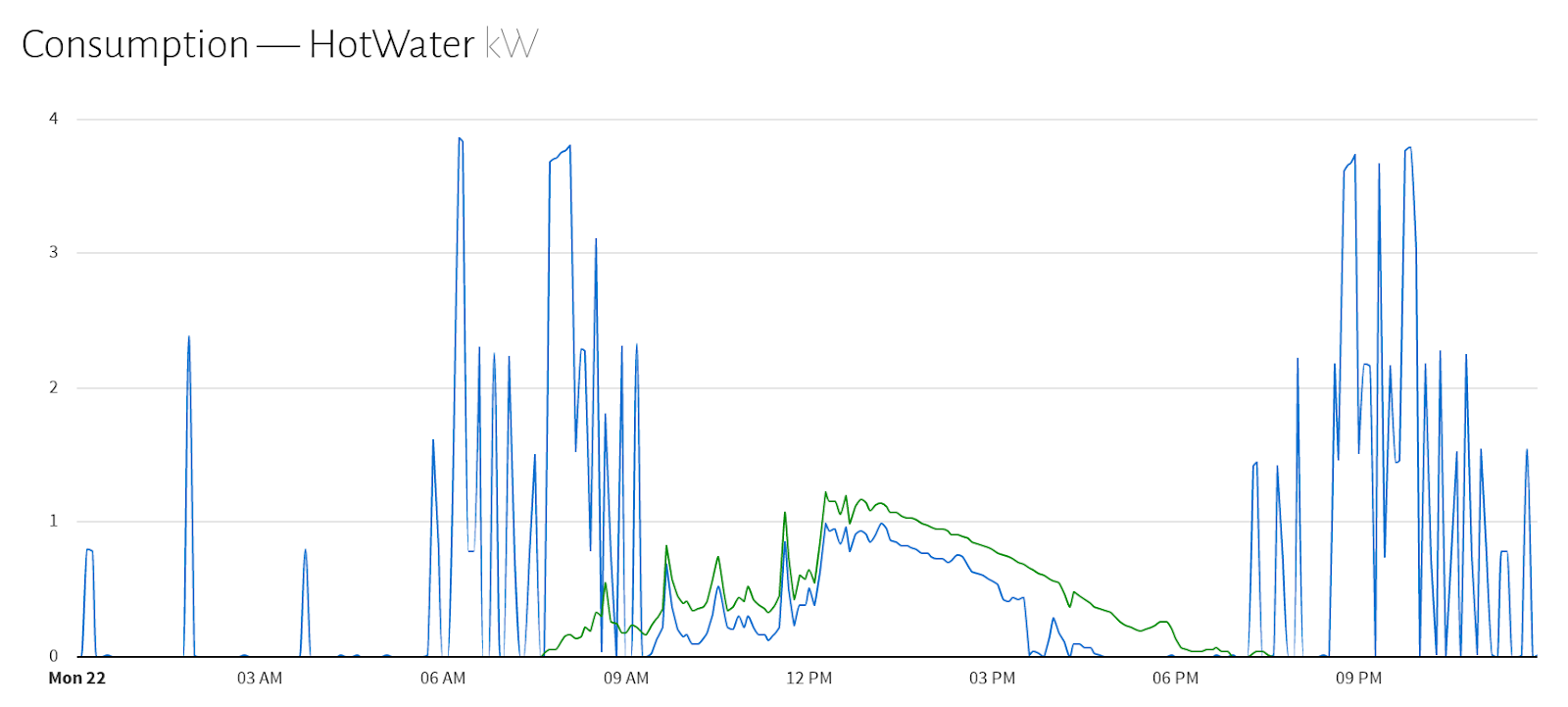
emergent is only one of many open-source “deep learning” applications that “learn” based on the examples within a prepared data set. The method of how a neural network works, as I understand it, is that it is a software able to find patterns in data after being exposed to a set of “trials” which represent the examples of how a system has been performing in a certain context represented by input variables. It looks at each of these examples, and runs through them iteratively as a set, creating what are a series of weights that drive a non-linear solution to the problem. It is iterative because it aims to find the best solution by modifying those input weights to see if that helps it get closer to the solution - but it needs to run through all the examples to gauge whether this modification was an improvement. The theory is that by doing this over and over, always following what worked best last time, the neural network gains “experience” with the data, and eventually builds a model - described mostly by the weights it settles to - that may closely describe the real world as measured by the data you collected. And it’s not something that's a “rule of thumb” or a simple calculation - it is a site-specific, non-linear solution that possibly can only be approached using this empirical methodology. I don’t know if the “Three-body Problem” is a proper analogy but I always think of the fact that while two planets in space can have their orbits with relation to each other described by a formula involving their respective masses and the distance between them, there is no such formula for 3 planetary bodies. It’s not that the orbits of 3 planets cannot be found, it’s just that it relies on circumstantial, empirical data and not a formula you can plug values into. Similarly, I believe there is no real ‘formula’ to how you use or generate energy - it just depends on the day, the time, what you’re doing, what kind of loads you have and possibly what the weather is like. We’re calling that resulting pattern your energy signature because the line of energy use - mostly a continuous time series - has that kind of shape:

Example of an Energy Signature (lighting)

Example of an Energy Signature (hot water)
 
ARM vs. x86-64 vs. GPU

So there are a few neural network applications and they run on different processors. And on top of that, there are different ‘algorithms’ that each use to accomplish the development of correlations. In our tests, we are currently using a 3-layer network Back-Propagation algorithm which suited the task, and it is one of the most standard types of neural networks. Much more complex architectures exist today and their complexity is actively handled by what seems to be a geometric growth of faster and cheaper multi-processor machines connected in clusters.

Possibly the most interesting innovation these days for deep learning has been the use of GPUs, using software frameworks that can tap the power of their parallel processing ability. Once such software framework is called CUDA (Compute Unified Device Architecture) from nVidia. This framework has been recently supported by emergent, and from the tests carried out by members of that project, the promised acceleration versus CPU is compelling - possibly a 2X - 10X multiple over a 4-core Intel processor and this performance can be achieved from a rather average gaming video card. Given the timeframe needed to develop an accurate energy signature for a building, we thought it would be good to test this out with SolarQuant.

Selecting your video card At the moment, the only GPU harnessing libraries that are supported by emergent are CUDA based, which leverages the nVidia chipsets. What seems to be one measure of expected performance is the number of CUDA “cores” on the video card. Given it was an experiment, I purchased the lowest cost nVidia card I could, namely the GTX750Ti, for around $238 NZD. This device seems to have 640 cores. To put this in context, you can see the list of different nVidia adapters and their cores here. So there are clearly more powerful units out there with several thousand CUDA cores - wow! That’s something to look forward to. Given the beast of a machine that could be built to do this job, I thought we better give these machines names to keep track. So this one is going to be called Taniwha One as an 4-core X86-64 box on emergent v7 and Taniwha Two as a 640-core CUDA computer on emergent v8.

Ubuntu 16.04 and LAMP I had the most recent version of Ubuntu, 16.10, loaded on a 3.4Ghz quad-core Intel i7 2600 machine, but when it came to compiling the special CUDA version of emergent, it did not work due to a change in the Qt5 webengine module which was needed for the application. So I installed in parallel a boot of Ubuntu 16.04, and also installed the CUDA 8.0 SDK available for download (quite large I thought at 1.9GB, but nothing major these days with broadband) from nVidia for Ubuntu 16.04 here. I followed the Build Linux directions for emergent here but with the added argument to the ./configure command:
--cuda
It chugged away for quite a while, but once it finished I set my environmental variable for LD_LIBRARYPATH using my .bashrc file:

export LD_LIBRARY_PATH=$HOME/lib:/usr/lib:/usr/local/lib:$LD_LIBRARY_PATH


And rebooted. I was then able to login and type into a command prompt window:

emergent_cuda


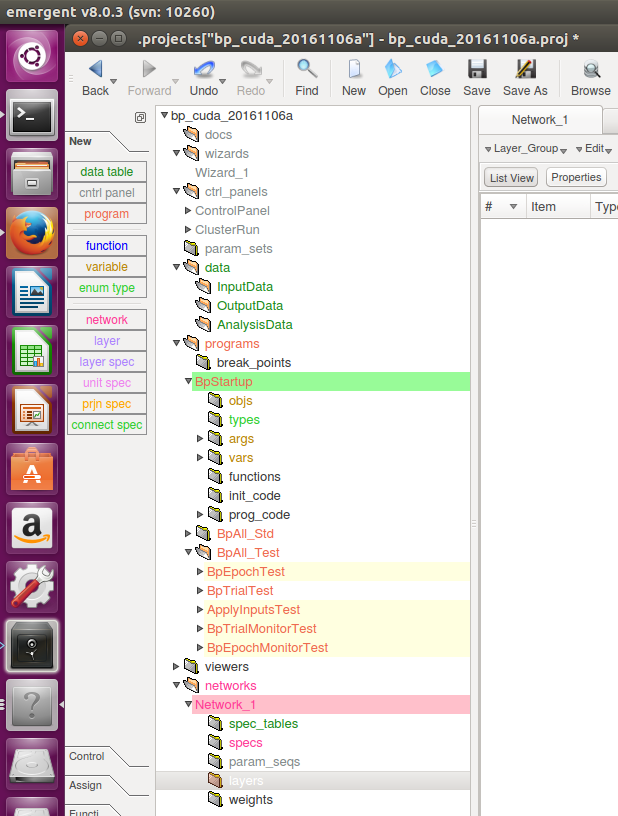
and up came the familiar GUI development toolset - but it looked pretty stylish this time compared with version 7.
emergent version 8
Emergent version 8
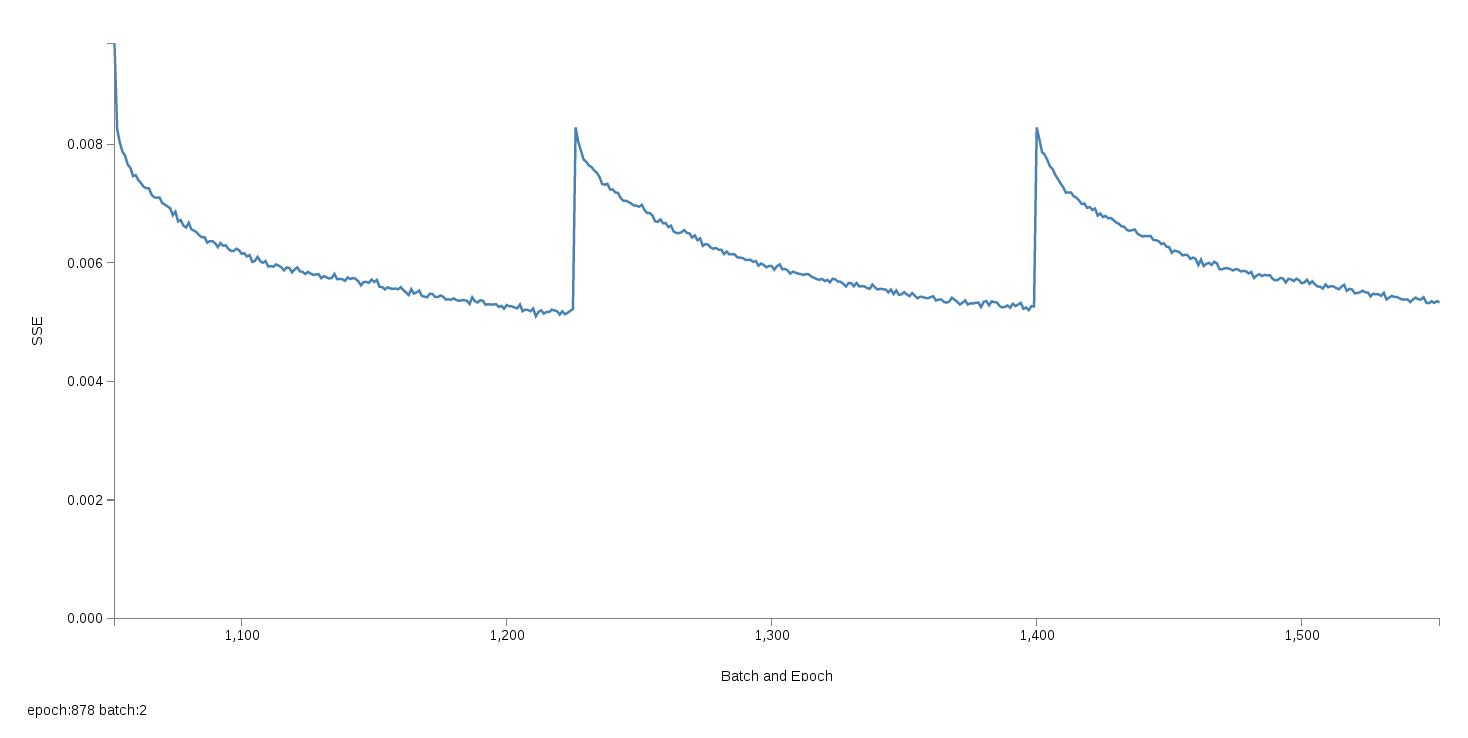
One of the nice things about emergent has been that you can do all your network design, testing and data loading using a GUI tool. The flashy and responsive visualisation of the neural network learning process shows the training process as it happens, and the falling SSE, or Sum Squared Error as it “learns”. For our application, that means that the lower the SSE goes, the better the signature we’ve developed for this SolarNode. You can see a short video of emergent running on an early network we built here but essentially what matters is that over "Batches" of "Epochs" the network trains on data sets, and develops a signature to describe that data set. This chart below shows for example 3 Batches, each with 1000 epochs, an epoch being one run through your dataset of several thousands trials. As for results of this training, you can see that while not exact, the actual (orange) versus the neural network model of that data once trained (blue) is pretty close.
3 Batches showing falling SSE as the NN learns

Training results (orange=actual, blue=trained)

Compiling emergent v7 and emergent v8 emergent has a new version (v8) but because it is still pretty new, a lot of the development SolarQuant underway has been tested on a stable version (v7.01) which runs well on both Debian and Ubuntu Linux from my experience. And because emergent can run as graphical application or via the command line, it’s a great environment to try out new correlations in a once-off manner with the GUI on your workstation or laptop, or run scheduled training sessions overnight with cron scripting via the commandline. Changing between the two versions on the same boot OS I believe is possible... but just to keep things clean and working, I have separated the two boot partitions. You wouldn't think a laptop could be powerful enough to run a massive compute intensive program like emergent, but it runs fine alongside a LAMP server on a $269 (USD) Dell Inspiron 14. I recently saw this machine however, and thought it might be a great workstation for this kind of work. And depending on how fast this GTX750Ti is, it may be something to start saving for - the GTX1060 has 1920 cores! - a multiple of 3 from Taniwha Two. Taniwha Three perhaps? In each of the emergent runtimes, you can set the number of epochs you want to run through - which is essentially how many times you go through your data set, and then batches of these epochs. You can see those 3 falling peaks in the chart above - those are batches. You can even split those batches across multiple processors I understand for further scalability, although I have not tried this yet. After each successful run, you can also output the weights matrix that your network finally got to - these small files hold the cumulative product of the training. You reference this weights matrix when you want to bounce new data off a trained network to get an "answer". Rebuilding my Back-Propagation network The only "algorithm" within emergent that can currently take advantage of the CUDA framework is the "bp" or Back-Propagation algorithm. While not the most advanced out there, it is probably appropriate for these kinds of time series experiments, and luckily that is what I've been testing with in SolarQuant. One of the cool aspects of emergent is that it contains a whole scripting language of its own which you can use to customise what you want it to do when your network project gets loaded. By passing arguments to the command line for emergent, you can tell it which program you want to run, which batches you want to run, and other important information like input data files to work with or matrix weights to start with. Because version 8 is a whole new build, the project file that I developed in v7 cannot be simply opened in v8, but has to be “rebuilt” which is essentially creating it again, defining the layers and setting the programs, using the new GUI. We’ll see how that process goes, but I intend to be able to do side by side comparisons between Taniwha One and Taniwha Two. Next post: Check in on how we’re doing with performance testing in Part 2...

Monday, September 19, 2016

SolarNetwork guides updated

I've been updating and adding to our user and developer guides for the SolarNetwork platform. Remember the whole SolarNetwork platform is open source, so it's easy to jump in and start using it.  If you need any help or you have a project that needs development resources, please do get in touch.  We are ready and waiting to help.

Friday, May 2, 2014

SolarNode plugin system

A long time ago SolarNode development switched from a traditional style Java application to a modular OSGi based one. One of the reasons for the switch was the premise of allowing users to easily download and use SolarNode modules without having to restart the SolarNode application. In OSGi installing, starting, stopping, and uninstalling modules (called bundles in OSGi) is fairly trivial. What SolarNode has lacked, however, was any friendly UI to allow users to browse the available modules and install the ones they want.
Finally that is about to change. The first step to enabling this feature was the deployment of a SolarNetwork-hosted software repository. There are a few open source packages out there, I ended up using Apache Archiva. Now SolarNetwork has a Maven-compatible online software repository to host its own modules, and the build infrastructure has been updated to easily publish modules as they are developed.
Browsing the SolarNetwork Repository
The next step was to make use of the OSGi Bundle Repository (OBR) developed as part of Apache Felix. OBR provides a way to resolve OSGi bundles along with their dependencies. Unfortunately, Archiva does not publish OBR metadata so I turned to another Apache project, Karaf Cave. Cave can act as a OBR proxy to a Maven repository, in which case it scans the Maven repository and generates OBR metadata files from which the OBR resource URLs point back to the artifacts in the Maven repository.

The final step was to develop some SolarNode bundles to enable configuring OBR URLs and a UI to allow users to browse the available software and install or remove individual modules. You can see the result of this work in the following demonstration:


This is a big step forward both in terms of ease of use for users and the SolarNode software development process!

Wednesday, May 22, 2013

Auckland EV charging goes live!

Earlier in the month we powered on the Greenstage charging station for the first time (this is the 3rd one in NZ according to APEV). This provides charging via a variety of connectors and should cater for any Electric Vehicle in the country.  A vehicle that can connect to a standard New Zealand 10 Amp 240V socket, a 16 Amp EN 60309 2P+E socket (commonly used in motor homes and camping grounds) or a 32 Amp J1772 connector will be able to use the Greenstage charging station.
Greenstage charging station
The charging stations can also be connected to the SolarNetwork.  This allows charge station owners to control and monitor usage.  For example, if it's installed in a public place, it's possible to configure the station to require an EV owner to login to the SolarNetwork and optionally provide payment before charging begins.  This hopefully encourages more people to make their own charging infrastructure public and allows the charge station owner to be remunerated for the service they are providing and the electricity consumed during the charge.  If 50% of EV owners make their charging infrastructure public, it would be a quick way to create a nation wide network!

Currently Greenstage's Auckland based charging station is free and available for friendly EV'ers to drop in any time.  It is located at 19 Newton Rd in the city if you want to check it out and top your EV up.

If you are planning on popping in, please let us know.  We would love to hear any thoughts or feedback on your experience (send it in via email, or comment below).    As a bonus, if you charge while the sun is shining, your car will receive solar generated electricity from the rooftop PV array :)
PV on the roof!
(PHOTO: Tony Nyberg, courtesy Idealog)
Big thanks to Smart Sparky, Electrex and JuicePoint (the suppliers of the J1772 charging equipment) for making this happen.

--Philip

Tuesday, March 26, 2013

SolarQuery web service API

I've recently been working on improving the interface for external applications that interact with and access data from the SolarNetwork.  Here is a quick update on where things are at.

SolarQuery is the SolarNetwork application that exposes web services for querying the data collected by SolarNodes. SolarQuery is what enables data visualizations like Consumption Monitor and Generation Monitor. This API is still being developed, but we've created a API Sampler page that demonstrates the latest API.

The sampler also demonstrates the SolarNetworkWS authorization scheme used by the web API. This scheme is modeled after Amazon's AWS scheme used by RESTful services like S3 and uses the HMAC-SHA1 hash scheme to authenticate and sign each request. Owners of SolarNodes can log into the SolarUser application to manage their nodes and create security tokens:


These tokens are then used by the SolarQuery web API, and the API Sampler page shows how to properly sign each request using the tokens (it uses the open-source crypto-js library to handle the HMAC encoding). The sampler also provides API method templates to quickly test different methods, and will show the results of the method call directly in the page:

After the web service API is expanded and has sufficiently stabilized, we'll create more complete documentation on the API.

Any feedback is appreciated.

Enjoy!

Tuesday, November 20, 2012

Sunday in review (the Greenstage Gathering)

We had a great turnout on Sunday, with people coming and going all day long.  Plenty of EVs onsite with people just dropping in to show off their cars and others coming to see what's happening and what's possible for them.  This is exactly what we like to see!

Greenstage Gathering 2012
The underlying community focus and vision from Greenstage (and the associated Open Source technology projects, Tumanako and SolarNetwork) is explained within the 2012 flyer, please download this and share it around or have a look at the image below.

Greenstage Community Focus
Mid afternoon we demonstrated the SolarNetwork enabled charging pedestal in action, we showed how this facilitates the sharing of existing charging infrastructure amongst EV owners.  People registered with the SolarNetwork can enable other peoples charging pedestals anywhere around the country (assuming the owners of the pedestal have granted permission for this).  They do this using the Android based Tumanako Dashboard which uses wireless communications to activate the charging pedestal (as well as activating charging pedestals, this dashboard also monitors your EV performance while driving). 

Tumanako Dashboard
This is a very low cost way of creating a charging network that grows as demand grows (every EV owner already installs some form of charging infrastructure at home, so even if only 50% of EV owners join the network, this will easily create a nationwide distributed EV charging infrastructure).

Community Charging
Not to be outdone, Chris Olsen announced the Energy Share co-op to great excitement.  Already it's obvious that people have been hanging out for this and that the co-op is going to be a game changer with respect to personal energy independence.  You can download more information on EnergyShare from here and if you are ready to join and get involved, please fill in the online form.


So all in all it was a great day.  Lots of learning, lots of fun and lots of opportunity for everyone.  I know I haven't covered everything, but please feel free to share your thoughts and experiences in the comments section below, the more we share the more everyone benefits.

Finally, these gatherings don't happen on their own, its the community that brings it all together.  So a big thanks to Grey Lynn Dogs, Switch EV, Electrex, Stewart Design, Diamond Age Solutions, Andrew Simms Mitsubishi, Andy Harper Tyres, APEV, ECONZ, Athol, Warren, Jeremy, Steve and Dee, Tom and Tabitha, my wife Kirstin, Dylan Aimee and Sophie, plus all the Greenstage crew and their families for making this happen, it wouldn't happen without you.

Exciting times ahead, the technology is ready, the community is growing and we are all eager for change.
Lets make it happen!


Tuesday, October 9, 2012

Energy Datapalooza!


My name is John Gorman and I was one of the folks initially involved in starting the SolarNetwork platform, and am a director of Greenstage Power Ltd. SolarNetwork is a software platform for the the acquisition  storage, visualization and analysis of energy data from distributed and heterogeneous sources. In fact, it will do more than that now, thanks to Greenstage Power's efforts, but this is my first Greenstage Blog entry,  so hello!

Back in May 2012, I was invited to attend an Energy Data Jam at Stanford University, to help brainstorm how the use of open government data in the U.S. could serve as a catalyst to innovation in efficient energy use and conservation. Split into groups, we dreamed up and presented to the full group (about 40 people) a dozen or so "apps" that used government datasets.  At that meeting, U.S. CTO Todd Park told us it wasn't just about brainstorming, it was about really coding these apps, in 90 days.

Following up from the Energy Data Jam,  I was invited to represent SolarNetwork at the Energy Datapalooza in Washington DC on Oct 1, 2012. This was the conference organized by the OSTP (Office of Science and Technology Policy) an arm of the White House whose mission is to drive innovation and advise the president on technology changes and opportunities. The Energy Datapalooza was focused on celebrating the release of a number of open APIs allowing access to government data sets, and to highlight the entrepreneurs who were already starting to leverage those APIs for new products and services. From census data, to auto efficiency standards, to near real-time electricity usage, the APIs exposed a huge amount of valuable data and developers were busy doing mashups and apps that used it. A lot of credit should go to two guys who were really energetic in making this a reality: CTO Todd Park and EDI (Energy Data Initiative) Director Ian Kalin. Their passion for opening up data as a  catalyst for innovation and their bold, aggressive and open approach to welcoming experimentation is really appreciated. I think that once the GreenButtonConnectMyData API is opened up, (to be released soon) we're going to see some very interesting applications appear. One very interesting speaker at the Energy Datapalooza was Dr. Steven Chu, Secretary of Energy. A Nobel Prize winner in Physics, Dr. Chu spoke about the role of data streams and core technology as a fuel for innovation, and mentioned the impending falling prices of both PV and deep-cycle storage, with some very interesting applications coming up. We are of course eager to hear more, so we'll stay tuned!


Monday, July 30, 2012

d3 gauge

Recently I implemented a "gauge" style chart for displaying live power output of a PV installation. d3 is a fantastic JavaScript visualization framework, and is great for animating live data feeds.

See a "live" example at bl.ocks.org/3202712.

This component and many others are being rolled out to enhance a number of distributed generation and monitoring solutions throughout New Zealand and the Pacific.

Greenstage Commercial Solutions

At Greenstage we continue to innovate and enhance the Open Source capabilities of the SolarNetwork while also delivering high quality commercial solutions to the world.

If you need commercial solutions or SolarNetwork support, please don't hesitate to contact us.  If you are an Open Source developer interested in distributed energy solutions, please join us on SourceForge!

Tuesday, April 10, 2012

SolarNode web configuration

Matt has been improving the usability of the SolarNode and SolarNetwork software and as a result, SolarNodes now support web based configuration!  Check it out:


Monday, February 13, 2012

Introductions, and expansion on minimalist Debian 6 SolarNode setup

This is my first post on the Greenstage blog, so a brief introduction is in order. I've been developing the SolarNetwork platform since meeting John Gorman in mid-2008. I was already interested in renewable energy, and a proponent of open source software, so SolarNetwork was a natural fit. John introduced me to Philip Court later that year, and eventually we joined forces formally as Greenstage Power, Ltd. with myself as CTO. SolarNetwork has already evolved considerably in many exciting ways over these past few years, and I look forward to seeing where the future takes it.

As for the original impetus for this post, I've expanded on Philip's previous post on setting up Debian 6 for a SolarNode on an eBox 3300 mini computer. Some of the improvements in this guide are:
  • Stock i386 Debian kernel used
  • OpenNTPD for time synchronization (instead of usual ntpd)
  • Monit for process monitoring
  • busybox-syslogd in-memory cyclic syslog
  • SolarNode platform uses a ramdisk for logging, temporary files, and the embedded database
These last two points greatly reduce the number of writes the system performs on disk, with the idea of reducing writes to the flash-based media used as the system's main filesystem.

The guide is available on the SolarNetwork Wiki. The entire system described by that guide is also available as a downloadable disk image that you can easily copy to a SD card or USB stick.

Sunday, January 15, 2012

Minimal Debian install on a Vortex86

For our SolarNode installations (part of the SolarNetwork) we use a minicomputer with a Vortex86.  This is a system on chip (SoC) x86 compatible CPU which has all the bells and whistles on one piece of silicon.

JrMX with Vortex86 inside
We had until recently been installing a standard Ubuntu distribution which was working very nicely.  Problem was this distribution was full of many unneeded software modules.

Over the break I finally got around to sorting out a bare bones installation that only contains what we need (no GUI required!).  Not only does this increase performance and reduce disk space requirements, but it enhances security by keeping deployed software to a minimum (less software equals less security updates).

Here is the process we have used to build a bare bones SD boot image with the latest native WiFi support (no ndiswrapper here) on a Norhtec JrMX.  Read on... 

First up: Find yourself an Ubuntu or Debian based PC to prepare your bootable SD card.  Make sure you have unetbootin or similar installed (usefull for creating a bootable SD or USB stick from an iso).

# sudo apt-get install unetbootin

Use unetbootin to create a bootable SD card (I used a 4GB) using this Debian squeeze mini iso.

Now boot the JrMX (with network cable connected) from the freshly made bootable SD card and complete the installation process (could take a while with lots of downloading).

Once finished, there will likely be some additional packages you will want to install e.g. ssh-server, ntp, wicd, wicd-curses etc.

# apt-get install ssh-server
# apt-get install ntp
# apt-get install wicd
# apt-get install wicd-curses

FYI: We use wicd-curses to configure WiFi from command line (instead of the NetworkManager GUI or similar).

Now, get Ready for the Kernel upgrade and WiFi driver install...

Squirt the stuff (Kernel and WiFi Driver) across to the JrMX from your desktop (connected using network cable at this point in time).
e.g.

$ scp linux-image-2.6.34.10-vortex86-sg_1.2_i386.zip  philipc@10.1.1.11:
$ scp RTL8188_8192SU_usb_linux_v2.6.6.0.20110401.zip philipc@10.1.1.11:


Now, on the JrMX box (ssh in or login using physical keyboard and monitor), install the new kernel and the kernel headers:

# unzip linux-image-2.6.34.10-vortex86-sg_1.2_i386.zip
# dpkg -i linux-image-2.6.34.10-vortex86-sg_1.2_i386.deb
# dpkg -i linux-headers-2.6.34.10-vortex86-sg_1.2_i386.deb


Now Install RTL8188SU Linux driver (for WiFi), but first we need to sort out the missing build link to the header source files:

# rmdir -–ignore-fail-on-non-empty /lib/modules/2.6.34.10-vortex86-sg/build
# ln -sf /usr/src/linux-headers-2.6.34.10-vortex86-sg /lib/modules/2.6.34.10-vortex86-sg/build

Download and unzip the latest RTL8188SU driver (which is actually the same as RTL8192SU driver).  The one I specifically used is here, or you can get it from the realtek site. 

#unzip RTL8188_8192SU_usb_linux_v2.6.6.0.20110401.zip

Note: This works great, but readme instructions from the older rtl8188_8192.zip (this one is from the robosavvy site) are much more informative.  Follow the readme instructions which are summarised below ('make' and 'make install' basically)...

Note: You will also need the following to build the drivers (if you want, remove with apt-get remove at the end):

# apt-get install build-essential

Extract, build and install WiFi drvier from unzipped source dir
:

# cd rtl8712_8188_8191_8192SU_usb_linux_v2.6.6.0.20110401/driver
# tar -xzf rtl8712_8188_8191_8192SU_usb_linux_v2.6.6.0.20110401.tar.gz
# cd rtl8712_8188_8191_8192SU_usb_linux_v2.6.6.0.20110401
# make

  ...
  Building modules, stage 2.

  MODPOST 1 modules
  CC      /home/solar/rtl8712_8188_8191_8192SU_usb_linux_v2.6.6.0.20110401/driver/rtl8712_8188_8191_8192SU_usb_linux_v2.6.6.0.20110401/8712u.mod.o
  LD [M]  /home/solar/rtl8712_8188_8191_8192SU_usb_linux_v2.6.6.0.20110401/driver/rtl8712_8188_8191_8192SU_usb_linux_v2.6.6.0.20110401/8712u.ko
make[1]: Leaving directory `/usr/src/linux-headers-2.6.34.10-vortex86-sg'


# make install
install -p -m 644 8712u.ko  /lib/modules/2.6.34.10-vortex86-sg/kernel/drivers/net/wireless/
/sbin/depmod -a 2.6.34.10-vortex86-sg


# shutdown -r now


NOW LETS GET THAT WiFi GOING!


Check a few things:

# ifconfig wlan0 up
# iwlist wlan0 scan
# iwconfig


Configure the WiFi connection (use wicd-curses, it's like NetworkManager, but a command line tool! Just follow your nose...)

#wicd-curses

Yea Ha!!!! It all works :)

You may want to turn off a few other things as well, but this is a great starting point for a minimal install.

Enjoy!

Note: Please make sure you see Matt's update on this post as well.

Wednesday, October 5, 2011

Solar ADR v1.0

The Greenstage Power team has been working on Solar ADR (an extension of the SolarNetwork) which is an OpenADR v1.0 compliant solution for organisations like Transmission System Operators or Lines Companies to manage demand on their grids.

This Solar ADR v1.0 solution has now reached a point where we cannot easily add value to it without an explicit commercial application, hence we will be packaging this away for when the need arises (please contact us if you have such a need!).

In the mean time, we will be putting our focus into the home owners Smart Grid experience. Again this is an extension of the SolarNetwork and it will be a major overhaul including significant enhancements to the current SolarNetwork console. The purpose of this is to give the home owner visibility and control over their systems performance. Our goal is to 100% provide benefits to the home owner!

Here are some screenshots of the SolarADR product:


Stay tuned for more details :)

Sunday, July 17, 2011

John Scott – The Third Industrial Revolution?

John Scott (from Chiltern Power) visited New Zealand recently as part of the IET Prestige Lecture series. I was lucky enough to see him speak in Auckland and I was pleased to see that there is good alignment and we have not been wasting our time! :)

John was also interviewed by Chris Laidlaw on his Sunday morning Radio New Zealand show. In this interview, John sums up what is going on perfectly and provides a good background on what a Smart Grid actually is.

To understand what I'm on about, here are the links to the interview from the Radio New Zealand site (choose your preferred format):
Enjoy!

Thursday, August 19, 2010

Renewable energy, Smartgrid and Electric Vehicles as they fit into an open-source context

John Gorman (of SolarNetwork fame) and I are speaking tonight in Auckland at a joint IET and ESR meeting. Our topic is "Renewable energy, Smartgrid and Electric Vehicles as they fit into an open-source context". Details on the talk are available here.

This is the first public airing of where we are heading with Greenstage Power (a subsidiary of Greenstage), as we move to leverage SolarNetwork (and to a lesser degree Tumanako) technology to offer serious commercial solutions for distributed generation and demand side response services using Open Source technology.

If you are in Auckland come and check it out, its a free event.